
A circuit breaker provides protection by stopping the flow of electricity if an overload or fault occurs. When an electrical fault occurs or the load on your circuit becomes too great, the breaker on that circuit trips and interrupts the flow of current to that circuit. A tripped circuit breaker is still sometimes referred to as a “blown fuse” in reference to the older technology that circuit breakers replaced.
How to Reset a Breaker in the Power Panel
If the outlet is not on a GFI circuit or resetting the outlet breaker didn’t work, the next step is to check and rest the breaker in the Power Panel.
Video – How to identify and reset a breaker in the Power Panel

Before electricity can be restored, the circuit breaker must be reset. However, even before you do that, you must take steps to ensure that it is safe to do so. Turn off or unplug all of the devices that are plugged into the circuit. Make certain no dangerous condition exists before restoring power. A Circuit Breaker that has been tripped will either be in the middle or “OFF” position. Locate the tripped circuit breaker and reset it by pushing it all the way to the “OFF” position and then back to the “ON” position. Often when you cannot reset the circuit breaker, it is because it must be turned all the way to the “Off” position first.

Electricity should now be restored to the circuit. If the circuit breaker trips again before you have turned anything on or plugged anything in, please submit a maintenance request to RMW Property Services via the maintenance portal.
If no circuit breakers were tripped and you still do not have power at an outlet, the circuit is probably on a GFCI. Please see FAQ #2 “I lost power to the kitchen, bathroom, or outside”
A GFCI (Ground Fault Circuit Interrupter) or also called a GFI outlet is a device that adds a greater level of safety by reducing the risk of electric shock in locations such as bathrooms, kitchens, laundry rooms, and outdoors. If you have lost power to one of two outlets in your home the issue is likely due to a tripped GFI outlet or breaker. Before we schedule an electrician, please try resetting the GFI outlet. Video – How to Reset a GFI Outlet
If the outlet doesn’t have reset buttons, see: Video – How to Reset a GFI Outlet with no buttons

If you are not able to locate and reset the GFI outlet or Breaker please let us know, as if the breaker does just need to be reset, the cost of electrician will be a residents responsibility.
If after unplugging everything, checking the circuit breaker or fuse, and resetting the GFI does not work, please submit a maintenance request to RMW Property Services via the maintenance portal.
If you have an older home, you may have fuses as opposed to circuit breakers. Located inside or outside of your home is a fuse box that contains a fuse for each of your home’s circuits. A fuse provides protection for each of your circuits. When an electrical short occurs or the load on your circuit becomes too great, the fuse on that circuit burns out and breaks the circuit; this is what is referred to as a “blown fuse”. If your home uses circuit breakers instead of fuses, refer to FAQ #1 “I lost power or need to reset the circuit breaker”.
Before electricity can be restored, the fuse must be replaced with a new fuse. However, even before you replace the fuse, you must take steps to ensure that it is safe to do so:
- Turn off or unplug all of the devices that are plugged into the circuit. Make certain that no dangerous condition exists before restoring power.
- Replace the fuse with a fuse that is of the proper rating for the circuit. For instance, if the circuit is rated for 15 amps, use a 15-amp fuse. Never use anything other than a fuse of the proper rating.
- When removing or inserting a new fuse, NEVER touch the metal parts of the fuse. If your fuse box is equipped with a master switch to cut power to the fuse box, cut the main power prior to replacing the fuse.
Electricity should now be restored to the circuit. If the fuse blows again before you have turned anything on or plugged anything in, submit a maintenance request to RMW Property Services right away.
If the fuse blows after plugging in or turning on a device, that device may have a short or maybe placing too much of a load on the circuit.
If no fuses were blown and you still do not have power at an outlet, make certain that the switch, if any, that controls the outlet is turned on. If you can find no problem, the outlet, switch, wiring or some other component may be at fault. Also, the outlet may be on a GFCI branch circuit. Please see FAQ #2 “I lost power to the kitchen, bathroom, or outside” for information on GFCI outlets and how to reset them.
If these steps do not resolve the issue, please submit a maintenance request to RMW Property Services via the maintenance portal.
If you turn on your garbage disposal and it doesn’t sound like the blades are spinning or it makes no sound at all, it could be jammed and/or need resetting. Here are some troubleshooting tips:
To Reset your Disposal (no sound):
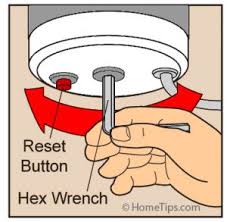
- First, make sure the disposal switch has been turned off. Locate the button on the bottom of the disposal (reset button) and press. Turn switch back to “on”.
- Should nothing happen, check your breakers and make sure none of them are tripped.
- If it turns on but the blades are not spinning, it could be jammed. See below. DO NOT PUT YOUR HAND INSIDE THE DISPOSAL
To Unjam
your Disposal:
- Make sure the disposal is off. Take a hex/Allen wrench and insert it in the bottom center of the disposal and turn to manually rotate the blades.

- Turn the disposal back on to see if the blades are now spinning smoothly.
- If you hear a grinding sound, there may be an item stuck in the disposal. Turn the disposal back off and use a flashlight to inspect and retrieve the object. Test disposal again.
If these steps do not resolve the issue, please submit a maintenance request to RMW Property Services via the maintenance portal.
* Just a heads-up: per your lease agreement, tenants are responsible for clogged drains. We’re happy to send our plumber, but please note the cost of the repair will be billed to you.
Helpful video links:
External Link: How to properly use your garbage disposal
Natural gas smells bad on purpose. That “rotten egg” smell is the smell of natural gas. If you think you smell gas, leave the area immediately and then call PGW at 215-235-1212 from a safe location.
Also if You Smell Gas:
- Do not use electrical devices including cell phones which may cause a spark and ignite the gas.
- Do not use an open flame, matches or lighters.
- Do not try to locate the source of the gas leak.
- Do not try to shut off any natural gas valves or gas appliances.
- Do not start vehicles.
- Do not re-enter the building or return to the area until a PGW employee or a qualified utility representative says it is safe to do so.
- Do not put out the flames if natural gas ignites
- Call our Emergency line at 267-809-2660
To troubleshoot the issue of not having hot water, you can relay the following steps to the Tenant:
Check the Thermostat: Ensure that the thermostat on the water heater is set to the correct temperature. It’s usually recommended to set it to around 120°F (49°C) for optimal performance.
Inspect the Circuit Breaker: If you have an electric water heater, check the circuit breaker panel to ensure that the breaker for the water heater hasn’t tripped. If it has, try resetting it by switching it off and then back on. See FAQ #1 and #3 for assistance with circuit breakers and fuses.
Pilot Light: If you have a gas water heater, check to see if the pilot light is lit. If it’s out, follow the manufacturer’s instructions to relight it. Usually, this involves turning the gas valve to the “off” position, waiting a few minutes, and then turning it to “pilot” while using a match or lighter to ignite it.
If these steps do not resolve the issue, please submit a maintenance request to RMW Property Services via the maintenance portal.
- To change your home air filter, you’ll first need to turn off your furnace. This will help protect your HVAC system from loose debris or a loose filter fitting escaping into the duct.
- Find and Locate Your Furnace Filter. Most air filters are located in either the blower compartment of the furnace (remove the furnace cover, typically by lifting up), or built into the metal ductwork before the blower fan. **Some of these systems come with filters that can be hosed off or rinsed in the sink or bathtub. Others use fiberglass filters that can’t be reused. These filters are easily found at hardware, home improvement and even grocery stores.
- Determine the Size of Your Home Air Filter. You can typically find this information by partially removing the existing filter and look for its dimensions, usually printed on the cardboard filter frame. If you cannot locate the measurement, use a measuring tape or ruler to measure the dimensions for heights, width, and thickness.
- Remove and Dispose of the Existing (old) Air Filter. Before you remove your existing air filter, note the arrow on the filter frame that shows the correct airflow direction. You will want to install the new filter in the same direction as the old one. The “air-flow direction arrow” printed on the new filter should be pointed towards your furnace (or more specifically; an arrow pointed towards your furnace fan unit).
- Insert the New Air Filter. Again, note the arrow on the old filter frame that shows the correct airflow direction. Remove the old filter and insert the new one so that the airflow direction remains the same. Home air filters are designed to filter the air from one direction so that as they load up with dirt, they will not collapse or fall apart. It’s that simple.
- Return furnace to “on” position. Make sure you turn the thermostat in the “on” position once you have replaced the filter.
For more information on changing your furnace filter, click here: How to Change Your Home Furnace Air Filter
If you still require assistance, please submit a maintenance request to RMW Property Services via the maintenance portal.
* Just a heads-up: per your lease agreement, tenants are responsible for the filters. We’re happy to send our HVAC vendor, but please note the cost of the replacement will be billed to you.
Before calling in your problem or making a work order request, please check the below possible options:
- Check that a fuse hasn’t blown or that the circuit breaker hasn’t tripped. Replace with the appropriate fuse or reset the circuit breaker.
- Check the furnace filter. If the filter is dirty it needs to be replaced.
- Check the thermostat. Make sure the batteries are good and that the temperature isn’t set too low if the inside temp is high inside.
- Check the outside unit to make sure the fan blades are moving and that the unit is not iced over.
- Some AC units have a light switch right next to the furnace which turns the furnace and AC off. Because this switch is identical to a light switch, it gets turned off by mistake. Simply check any nearby switches. If they don’t turn the lights on and off, they may be turning the furnace and or AC on or off.
If these steps do not resolve the issue, please submit a maintenance request to RMW Property Services via the maintenance portal.
Before calling in your problem or making a work order request, please check the below possible options:
- Check that a fuse hasn’t blown or that the circuit breaker hasn’t tripped. Replace with the appropriate fuse or reset the circuit breaker.
- Check that your thermostat is on, heat is selected, and set at a temperature that would call for heat (not too low)
- Check that there is nothing obstructing the airflow from the heater or heater vents
- Electric furnaces, not baseboards or cadet heaters, often have a light switch right next to the furnace which turns the furnace off. Because this switch is identical to a light switch, it gets turned off by mistake. Simply check any nearby switches. If they don’t turn the lights on and off, they may be turning the furnace on or off.
If these steps do not resolve the issue, please submit a maintenance request to RMW Property Services via the maintenance portal. Within the request, please annotate the condition of your furnace filters and the status of any steady or blinking red lights.
Before calling in your problem or making a work order request, please check the below possible options:
- Check that a fuse hasn’t blown or that the circuit breaker hasn’t tripped. Replace with the appropriate fuse or reset the circuit breaker.
- In or around most furnaces there is what looks like a light switch. This operates the power to the furnace. Be sure this switch is on before completing the on-line maintenance request. You will be charged for the heating company to flip this switch.
- Check that your thermostat is on, heat is selected and is set at a temperature that would call for heat (not too low).
- Verify that your gas service is in your name or has not been disconnected for non-payment or other issues.
- Can you hear any fans or blower running? If no noise at all, the problem must be one of the items above.
- Is there a window with a blinking or steady red light? If so, please explain what you are seeing if you submit a work order request.
- Are your furnace filters dirty? If so, replace immediately. Dirty filters are the cause of 95% of all heating issues. If your lease requires you to maintain your furnace filters and you submit a request for maintenance and your filters are found to be dirty, you likely will be billed for all charges. To avoid inconveniences of not having A/C or no heat, keep spare filters handy and replace them at a minimum of once every three months.
If these steps do not resolve the issue, please submit a maintenance request to RMW Property Services via the maintenance portal. Within the request, please annotate the condition of your furnace filters and the status of any steady or blinking red lights.
External Link: How to unclog my drain
If these steps do not resolve the issue, please submit a maintenance request to RMW Property Services via the maintenance portal.
* Just a heads-up: per your lease agreement, tenants are responsible for clogged drains. We’re happy to send our plumber, but please note the cost of the repair will be billed to you.
| Symptom | Possible Solutions |
| Dishwasher does not work – no sound, water or lights |
|
| The dishwasher does not start but the motor hums |
|
| The dishwasher does not fill with water or it drains while filling |
|
| Water does not drain from the dishwasher |
|
| The dishwasher is leaking water or soap leaks around the door |
|
| Dishwashers not cleaning properly |
|
| The door does not close or latch properly |
|
| The dishwasher cycle does not complete |
|
| Detergent cup does not open |
|
| Dishes are not cleaned adequately |
|
External Link: How to turn off main water supply
External Link: Testing smoke detector / maintenance
All properties have smoke detectors. Properties with gas-burning appliances, a fireplace, or an attached garage should have a CO/Smoke combo.
They are usually clearly labeled if they detect carbon monoxide as well as smoke/fire.
Smoke detectors have 2 alarms that mean different things:
- Beep/chirp approximately 2-3 times every 5 minutes most of the time means the battery needs to be changed. If that doesn’t fix it, it may have lost power to the unit or have a loose connection. If you unplug the detector from the ceiling/wall, it will probably continue making noise because there is a backup battery in most of them. If you take the battery out it still has enough power stored internally to beep 4-5 more times.
- Beeping/chirping non-stop means there is smoke/fire or it’s a false alarm.
See below for false alarms:
- Most false alarms (chirping non-stop) are caused by dust in the sensor area of the detector. – Fixed by blowing out with compressed air or vacuum.
- Some smoke detectors have an expiration (10yrs for example & usually labeled on the back of the unit) and after that time period, they start having false alarms. – Fixed by replacing expired detectors.
- Very rarely, false alarms are caused by drastic temp./weather changes, such as attic being 120 degrees and house at 75. – Fixed by pushing the silence button (if it has one) and after a short time, it will reset and hopefully not falsely go off again.
- Very rarely, false alarms are caused by air blowing directly on the detector (open window, ceiling fan blowing upward instead of downward, etc.). – Fixed by re-directing air movement away from the detector.
- Very rarely, false alarms are caused by a defective detector. – Fixed by replacing detector.
If, after trying these steps, you believe your smoke detector needs to be replaced, please submit a maintenance request to RMW Property Services via the maintenance portal.
External Link: I put the wrong soap in the dishwasher — now what?
Here are some common problems that could lead to a dryer not heating up — and simple ways to fix them.
Reasons Your Dryer Won’t Heat
- Blocked venting
- Improper or no electric or gas supply to the dryer
- Clogged lint screen
- Uneven loads
- Washer leaving clothes too wet
1. Blocked venting
This is the most common cause of a dryer, not heating. To check if your venting is clogged, start a timed dry on high heat. Go to the exhaust vent outside and use your hand to verify that the air is very warm and exiting at a decent flow. If there’s little airflow, your venting likely needs to be cleaned or replaced. If the temperature’s too low, there may be an operational issue with the dryer, which should be checked by an authorized service technician.
2. Improper or no electric or gas supply
Is there a proper electrical or gas supply to the dryer? Dryers get their electricity from a 240-volt circuit supplied by two 120-volt lines. If only one of the lines is working, the dryer will run but not heat up. With gas, the appliance won’t heat if your gas is off. Both issues should be checked by a professional.
3. Clogged lint screen
If your lint screen is plugged up or dirty, it will reduce airflow and prevent clothes from drying. Remove as much excess lint as you can and soak the lint screen in hot water and dish soap. If needed, use a soft toothbrush to scrub the screen clean.
4. Uneven loads
What type of load are you drying? If you mixed large and small items, that might be the problem. Washing and drying similar items together is imperative to proper performance. This is especially true on an auto dry cycle. Putting things like towels and sheets together can cause the dryer to heat at a lower level and sometimes even shut off, thinking the items are dry. The smaller or lighter clothes will be dry, but the larger, heavier items will still be damp.
5. Washer leaving clothes too wet
The dryer might not even be to blame — the issue could be with the washer. If your washing machine isn’t draining completely or isn’t spinning enough water out of the clothes, it will be harder for the dryer to do its job.
Bottom line: It’s a good idea to prevent these types of issues before they cause the need for a professional repair. Dryers are the number-one cause of house fires, so making sure yours is in tip-top shape is vital.
If these steps do not resolve the issue, please submit a maintenance request to RMW Property Services via the maintenance portal.
If your refrigerator is not working correctly, please visit this website for troubleshooting: http://www.repairclinic.com/Refrigerator-Troubleshooting
If these steps do not resolve the issue, please submit a maintenance request to RMW Property Services via the maintenance portal.
Tips to help prevent frozen pipes within a property:
- Open cabinet doors under all sinks to allow heat to get to the pipes
- Leave a cold water faucet on a slow drip as running water does not freeze as quickly and this will also help prevent burst pipes if the line does freeze
- Make sure any vents or openings under the house are closed
If a pipe is frozen the biggest danger is a burst pipe which will then cause flooding when it thaws. If the line is frozen please shut off the water supply to that pipe and try to expose heat to the frozen area. If you are unable to access the pipe or are unsure of what to do please shut off the water and submit a maintenance request via Buildium. We will then send a plumber to assist.
All exterior water pipes and hose bibs should have the water supply to them shut off, or freeze covers installed on all exterior faucets for the winter months
Helpful video: How to thaw frozen pipes


